
Problem
-
The calendar integration is not working.
-
Events from the calendar are not syncing properly.
Solution
Identifying issues with calendar integrations can be a bit tricky. In this case, please try the following:
-
Reconnect the calendar in Tempo using the Enhanced Connection and check if this makes any difference.
-
If the issue persists, try switching to the Basic Connection and verify whether this works.
-
In the My Work view, double-check that the option to show Incomplete / Rejected activities is enabled. If this option is disabled, some events may be hidden.
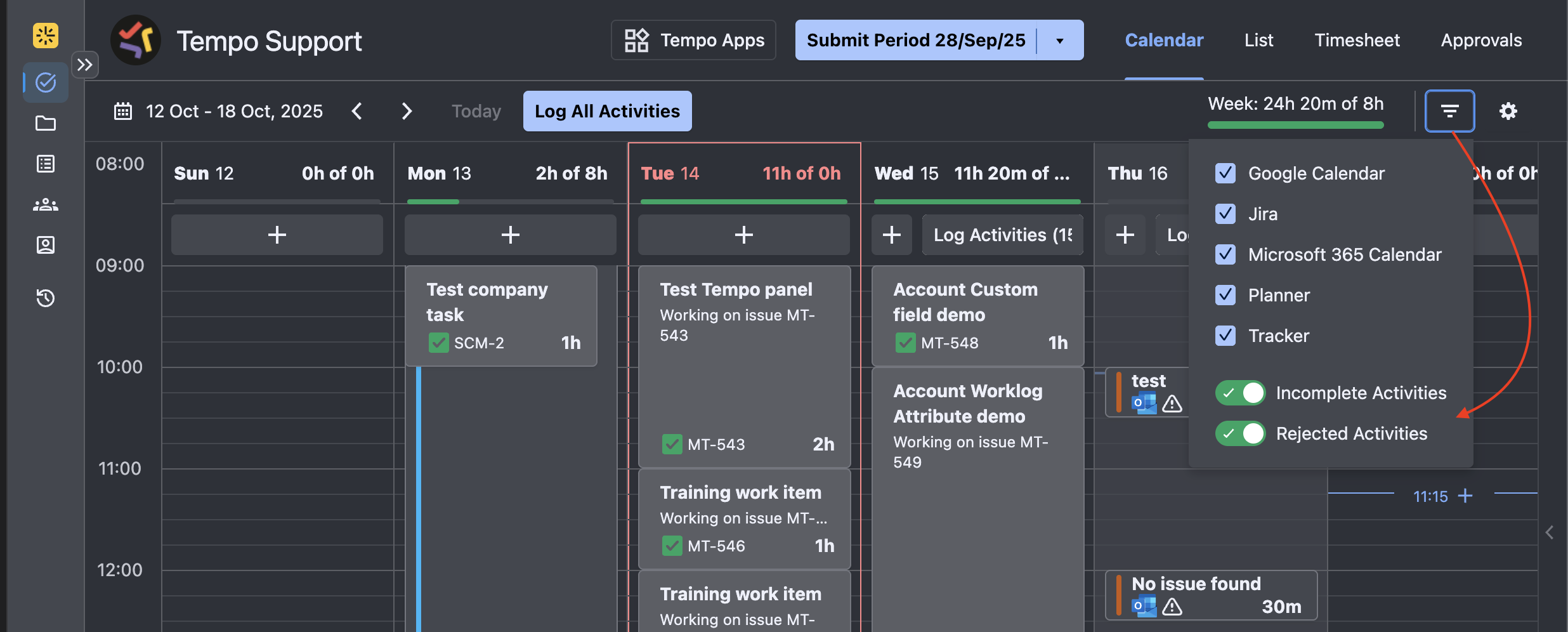
If this doesn’t work, to help us identify what’s causing the issue on your side, could you please check the following:
-
Are these meetings overlapping with other meetings, plans, or logged time?
-
Additionally, please share screenshots from both of the following:
-
The calendar where the event is created
-
The My Work view (Calendar view) in Tempo
-
-
Lastly, please provide the HAR and log files captured while opening Tempo. Please follow the steps below
-
Open your instance in a Chrome Browser
-
Open the Browser Console (press F12 or right-click on the mouse and choose Inspect)
-
Navigate to the Network tab, check the box next to "preserve log", and perform the steps to reproduce the problem.
-
Once completed, download the results as a .HAR file by clicking the download arrow ⬇️ in the Network tab (located on the top right corner)
-
Navigate to the Console tab of the browser console
-
Save the results as .log file (right-click and choose Save as)
-
Save the files and attach them to the ticket
If you are using a different browser, please look at Generating HAR files and analyzing web requests | Atlassian Support | Atlassian Documentation for information on how to create these files
-