
Problem
Even though Jira integration sync shows as completed when checking the sync status, there is an error of Invalid value: Two values with same label (JiraValue) but different IDs found in the "FieldName" field of your project. Please update one of the duplicate values in Jira before attempting another sync.
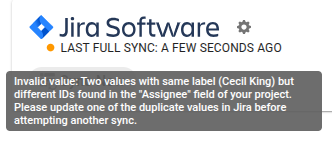
This is a data hygiene issue in Jira. This error appears when a Jira field has 2 or more values with the same name.
So far, we see that this is what triggers it:
-
Given a single Jira project
-
and in any given field
-
when 2 values have the same label, that is, say Fix Version has 2 values of:
-
2.1
-
2.1
-
.
Couple of Other scenarios which can result in the issue:
-
Issue Type field has 2 values -
To Doand a secondTo Doin the same project. -
User field with different user emails but the same full name
-
email: nicholas.doe@company.com, Full Name: Nick Doe
-
email: ndoe, Full Name: Nick Doe
-
Solution
This typically happens when first setting up the Jira integration on a roadmap. The Jira Account Admin will need to use the error message to identify the affected field and value, then edit the value's name so it is unique within that field. If the error refers to a user field, both the full name and public name will need to be changed — for example, updating "Nick Doe" to "Nick Doe Old."
If this error suddenly appears on an existing roadmap, first resolve the duplicate value in Jira as described above. Then, in Strategic Roadmaps, disable the affected field, run a sync to clear the existing field data, and re-enable the field before syncing again.
Note: resolving the duplicate in Jira alone may not clear the error right away, since the value already synced into Roadmunk can still reference the old ID. If the error persists after the Jira-side fix, follow the disable/sync/re-enable steps above rather than retrying the sync directly.