
Regularly auditing your roadmaps and removing inactive roadmaps makes it easier to locate important roadmaps and helps ensure everyone is using the most up-to-date data.
For the best experience, we recommend taking the following steps regularly to clean up outdated or unused roadmaps:
Generating a Roadmap Usage Report
The easiest way to identify inactive roadmaps is by generating a Roadmap Usage report:
-
Go to Account Settings | Reports.
-
Under Roadmap Usage Report, click Download CSV. The downloaded file can be opened in any spreadsheet program (Excel, Google Sheets, etc.) to easily sort and analyze the data.
Only Account Administrators can generate reports.
Learn More: Generating Account Reports
Alternative Approach
For teams with fewer roadmaps, or that don’t need as much detail when reviewing usage, you can also identify inactive roadmaps from the All Roadmaps screen.
-
Go to Roadmaps | All Roadmaps.
-
Sort your roadmaps by Last Updated.
This approach can also be used to clean up your personal roadmaps (Roadmaps | My Roadmaps) and team roadmaps (Roadmaps | Team Roadmaps).
Identifying Inactive Roadmaps
Based on the report you pulled above, identify those roadmaps that haven’t been updated in a long time (for example, 6 months or more). These are likely outdated or inactive and can be archived or deleted:
-
Archive: Keeps a record but removes it from active views. Great for historical reference.
-
Delete: Permanently removes the roadmap. This is best for outdated, irrelevant work.
We recommend:
-
6+ months: Likely inactive—consider archiving.
-
12+ months: Stale—consider deleting if no longer needed.
Archiving and Deleting Roadmaps
Before you can delete a roadmap, it must first be archived. This helps to ensure roadmaps that are still in use or need to be saved aren’t accidentally deleted.
For this reason, it’s best to start by archiving all your inactive roadmaps.
To archive roadmaps:
-
Go to the Roadmaps | All Roadmaps.
-
Sort your roadmaps either by Name or Last Updated.
-
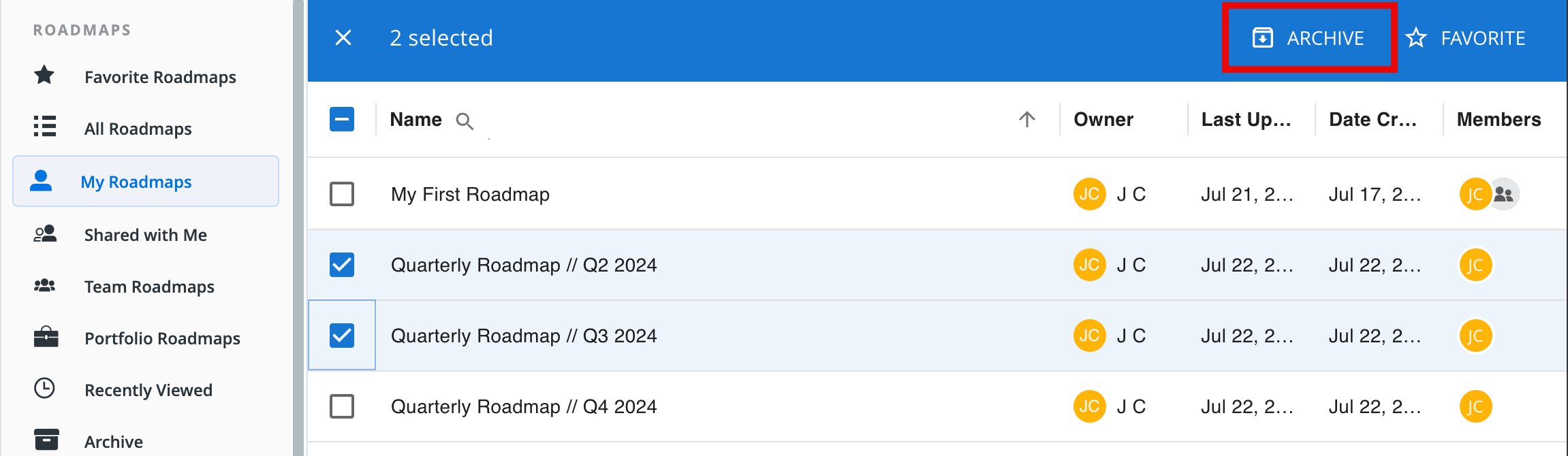
Hover over each roadmap you want to archive and click the checkbox that appears at the far left of its row.
-
Once you have selected all the roadmaps you want to archive, go to the toolbar at the top of the Roadmaps list and click Archive.
To delete Roadmaps
After these roadmaps have been archived:
-
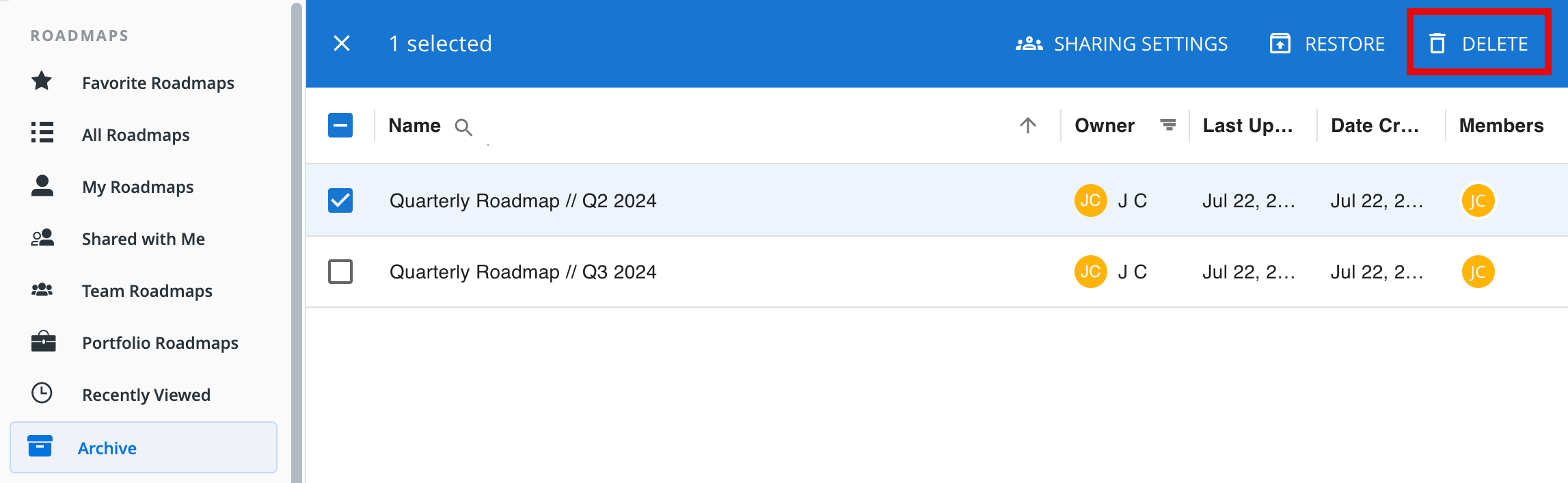
Go to Roadmaps | Archive.
-
Sort your roadmaps either by Name or Last Updated.
-
Hover over each roadmap you want to archive and click the checkbox that appears at the far left of its row.
-
Once you have selected all the roadmaps you want to archive, go to the toolbar at the top of the Roadmaps list and click Archive.
Learn More: Archiving