
2026-10-29
Capacity Planner Assistant Rovo Agent
We have introduced the Capacity Planner Assistant, a Rovo agent that provides a conversational AI interface for Capacity Planner. Embedded directly within Capacity Planner and available exclusively on Atlassian’s Forge platform, this assistant allows resource and project managers to ask natural-language questions about team capacity, resource availability, and delivery risk using live data.
Learn More: Capacity Planner Assistant
Audit Logging for Capacity Planner
We have added Capacity Planner events to our centralized audit logging (Tempo Settings → Audit Log) to provide administrators with a verifiable history of key actions, including plan creation, updates, deletions, and approval status changes.
Learn More: Audit Log for Capacity Planner
Improved Multi-day Logging in the Log Time Form
We’ve updated the Log Time form to make multi-day logging more accessible and intuitive. Previously, you had to click into the Date field and enable the "Period" toggle to log time across multiple days. Now, a new mode control is available, allowing you to instantly switch between Day and Period modes. Single Day remains the default mode, so no change is required if you prefer logging one day at a time.
Learn More: The Log Time Form
2026-10-07
Improved and Consistent Filters
We’ve redesigned the Filter by experience in Timesheets and Capacity Planner to provide parity across views and reports, and allow you to filter data using the same fields you use for grouping. Previously, Resource Planning, Team Planning, and Reports each had their own limited filter sets. Now, filters are consistent across all views, and your filter state carries over as you navigate between them. Key improvements include:
-
Expanded Filtering in Reports: You can now filter by Tempo work attributes in the Logged Time Report, and by Jira custom fields and more Jira standard fields (such as Assignee, Components, Fix Versions, etc.) in the Logged Time, Planned Time, and Planned vs Actual reports.
-
Redesigned Filter Component: A new, more intuitive filter interface that supports a wider range of Jira standard fields and custom field types (including text, select lists, and date pickers).
-
Seamless Navigation: Filter selections now persist when moving between Resource Planning and Reports, ensuring your data remains comparable without manual re-filtering.
Learn More:
Filtering the Data in Reports
Usage-based scoping for Data Center to Cloud migrations
We’ve improved the Jira Cloud Migration Assistant (JCMA) experience for Tempo Timesheets and Capacity Planner users by introducing usage-based scoping for Accounts and Teams. Previously, migrating a subset of Jira projects would still pull in every Account and Team from the entire Data Center instance. Now, Tempo only migrates the Accounts and Teams that are referenced by an issue in the selected projects.
Learn More:
Scoped Migration of Tempo Accounts and Teams
Fill in Timesheet Gaps with Expand Suggestions
You can now automatically expand your suggestions to fill your working day by turning on the Expand suggestions toggle in your My Work calendar settings, eliminating the need to manually drag and resize suggestion cards to close gaps.
Learn More: Logging Time to Your Activities
2026-10-06
Tempo MCP Server for Timesheets, Capacity Planner, Financial Manager
You can now enable a Tempo MCP Server that lets AI assistants like Claude, GitHub Copilot, and Cursor answer questions about your Tempo data in plain language — no exports or manual lookups needed. It's read-only and uses per-user authentication, so users see only what their own Tempo permissions allow.
-
Query worklogs, timesheets, capacity plans, and financial reports directly
-
Works with any standard MCP-compatible AI client
-
Supports both API token and OAuth authentication
Learn More: Enabling Tempo MCP Server
2026-09-24
Improved Reviewer Selection in Timesheets
We’ve updated the Reviewer dropdown in the timesheet submission flow to help users quickly identify the correct approver. Previously, the dropdown displayed a flat list of everyone with approval permissions. The dropdown now displays a split view, with Team Leads at the top of the list, followed by Other Reviewers.
Learn More: Submitting Timesheets for Approval
2026-09-08
Timesheets Reports page redesign
We’ve overhauled the Timesheets reporting experience to provide a more intuitive and efficient way to manage your data. This update focuses on personalization and ease of access, ensuring you can easily find and share reporting information.
Key changes include:
-
Seamless Continuity: Quickly resume your work with a new section that resurfaces your most recent unsaved or saved reports exactly where you left them.
-
Improved Report Management: A redesigned Saved Reports area features a searchable rail and a "View All" index to help you organize and locate reports faster.
-
Standardized Exports: Enjoy consistent export options across all reporting surfaces, including Summary, XLS, and CSV formats.
-
Enhanced Collaboration: A new Shared Reports section allows you to easily toggle between reports you own and those shared with you by teammates.
Learn More: Getting Started with Reports
2026-08-31
Timesheets Bulk Fetch Limit Bug Fix
Fixed an issue where the maximum 100 issue field requirement was not respected when using the new 1k Bulk Fetch limit.
Learn More: REST API
2026-08-26
Audit Logging for Tempo Projects in Timesheets
We have extended our centralized audit logging to include Tempo Projects for Timesheets users. This update provides administrators with visibility into when a Tempo project is created, deleted, or when project parameters or ownership change. Project events appear under the Projects category in the Audit Log page, while global project defaults are recorded under Settings.
Learn More: Audit Log
2026-08-04
Faster Tempo Reports for large issue sets
Tempo now takes advantage of a higher Bulk Fetch limit when loading issue data in Tempo Reports. Atlassian recently raised the limit from 100 to 1,000 issues per request, and Tempo now uses this new value automatically when loading your Reports. This means:
-
Faster report load times, especially for reports with large numbers of issues
-
Fewer calls to Jira's API behind the scenes, reducing the likelihood of hitting rate limits
We're rolling this change out gradually over the course of this week. Teams that regularly run Tempo Reports across large Jira issue sets will see the biggest improvement.
2026-07-29
Additional activity suggestions for Jira integration users in Timesheets
We've improved activity detection within Jira suggestions. Timesheets now detects when you edit an issue's description, summary, or attachments, helping capture more of your Jira work automatically.
-
Editing issue descriptions, summaries, and attachments now generates time-spent suggestions
-
Suggestions include clear, named reasons, such as "Edited Description" or "Updated Attachment," so you know exactly why time is being suggested
-
Available in My Work, the Log Time form, and the Tempo panel in Jira work item view.
2026-07-27
Improvement to Show Only My Approvals filter in Timesheets' My Work > Approvals View
Previously, the Show Only My Approvals filter would reset to off at the start of each new session. Now, your selection is saved and carries over to future sessions.
Show Only My Approvals is enabled by default in new sessions.
2026-07-20
Timesheets, Capacity Planner, and Financial Manager now available on AGC
Timesheets, Capacity Planner, and Financial Manager are now available on Atlassian Government Cloud (AGC), allowing public sector and regulated customers to use these Tempo For Jira products in a compliant, secure environment.
Learn More: Atlassian Government Cloud for Tempo
2026-07-14
Financial Manager Project Tags
The maximum number of project tags that can be used per Financial Manager project has increased from 5 to 10.
2026-07-13
Tempo Panel Behavior on Forge
Previously on Forge, the Tempo Panel had to be manually added to each Space by Jira admins, or to individual work items by users.
Now, the Tempo Panel is enabled by default again in the Jira work item view. Tempo Admins can disable it globally in Tempo Settings > Logging Time.
The Tempo Panel setting on Connect is preserved during migration to Forge. If there is no preexisting setting prior to migration, it is enabled.
2026-07-13
Admin Action Required: Forge Major Version Upgrade for Tempo Core, Timesheets, Capacity Planner, and Financial Manager
The Forge versions of Tempo Core, Timesheets, Capacity Planner, and Financial Manager have been upgraded to these major versions:
-
Tempo Core: 13.0.0
-
Timesheets: 11.0.0
-
Planner: 11.0.0
-
Financial Manager: 6.0.0
These major versions require admins to perform a manual upgrade. This upgrade includes the following changes:
-
Added manage:jira-project permission scope
-
Re-added Forge web triggers to product app manifests
-
Added Datadog URLs to manifest files
-
Fixed JQL search for team names within a project
-
Added Forge system token refresh via web triggers
If you're already on a Forge version:
Please manually upgrade to the latest versions. You will be prompted to upgrade through a pop-up:
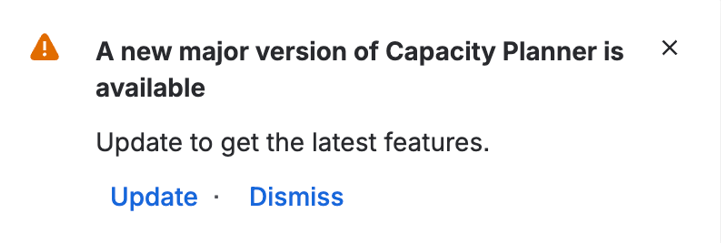
Or, you can also do so by navigating to Jira Settings → Marketplace Apps, then click Take me there → View app details and click on Update.
If you're on a Connect version:
No action required. You will be upgraded to the latest Forge major versions when you upgrade to Forge either manually or through the automatic rollout.
To check whether you're on a Connect or Forge version, follow these steps.
2026-07-13
Archiving Tempo Teams in Timesheets and Capacity Planner
You can now archive teams that are no longer in use, keeping your team lists clean and manageable without sacrificing historical data. Archived teams are hidden from active views by default, eliminating the need for workarounds like prefixed naming conventions or manually adjusted permissions. Full historical visibility is retained for audit and compliance purposes.
Learn More: Archiving and Restoring Teams
2026-06-25
New Jira Labels filter for Tempo Reports
A new JIRA LABELS filter has been added to the existing Tempo report filters, allowing users to filter the Logged Time, Planned Time, and Planned vs Actual reports by one or more Jira labels. Grouping by Jira labels has also been improved to display all labels associated with a work item in the report, rather than just a single label.
2026-06-03
Improvements to Calendar view in Timesheets
Previously, the toolbar in the Calendar view of My Work in Timesheets lacked a defined behavior when the screen size or viewport was below 1,728 pixels, causing elements to clip, overlap, or push the calendar grid out of view when the browser was resized or the viewport was otherwise reduced. Now, all primary toolbar actions remain accessible on screen for viewports 1220 pixels or larger, providing a smooth and consistent design for smaller viewports.
2026-05-22
Bulk import Jira Groups to Team Permission Roles
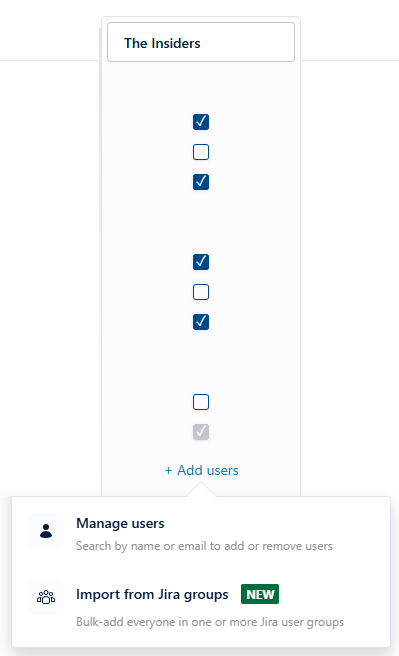
Timesheets and Capacity Planner now support bulk importing of Jira groups to team permission roles, eliminating the need to add permission role members individually.
Learn More: Creating Team Permission Roles
2026-05-12
Renaming Changes to Raw Data Export for Timesheets and Capacity Planner
As previously announced, renaming changes from “issue” to “work item” and from “project” to “space” are now implemented for raw data export fields. These changes will be rolled out to instances starting today, May 12th. Timing may be delayed depending on your instance version.
These changes may affect you if you use raw data exports in spreadsheets, BI tools, scripts, or other automated workflows. If those workflows reference export columns by their header names, they must be updated to use the new column names, such as “Work Item Key” instead of “Issue Key.” Workflows that reference columns only by position, such as “column C,” will continue to work.
2026-05-04
Timesheets Worklog Assistant Rovo Agent Improvements
These improvements are available in Timesheets 10.1.0, which is the latest Forge version. Before upgrading to this version, please review the Expected Change in Timesheets on Forge, as they may result in breaking changes.
We have made the following improvements to the Timesheets Worklog Assistant Rovo agent:
-
Custom descriptions on worklogs
You can now attach meaningful descriptions when logging time -
Smarter context
When logging from a Jira issue, the agent retrieves as much context as possible (such as the issue key and the current time) to simplify the time-logging experience. -
Worklog and suggestion retrieval
You can now get a list of worklogs and suggestions of what you worked on. -
Log time with required attributes
Specify worklog attributes for the agent to take action on, and the agent will confirm before completing the action.
Learn More: Timesheets Worklog Assistant
2026-04-29
Renaming to “Work Item” and “Space” in Timesheets, Capacity Planner, and Financial Manager
We have aligned our UI with Jira’s updated terminology, which renames “issue” to “work item” and “project” to “space.” Renaming changes to the raw data export are coming on May 11, 2026, and may include breaking changes. You can review affected columns here. Tempo API will remain unchanged.
These naming changes will also be phased into our Help Center documentation for Timesheets, Capacity Planner, and Financial Manager over the next couple of weeks.
Learn More: Atlassian Community
2026-03-30
Migration from Atlassian Connect to Forge
Timesheets, Capacity Planner, and Financial Manager have started migrating to Atlassian’s Forge platform. This transition will be automatically rolled out gradually, so the exact migration date for each instance will vary.
The migration will initially only affect new installations and admins who manually click the Update button. Please review the list of changes for potential impacts. We recommend updating manually to control the timing of your instance’s migration. Once the automatic rollout begins in the coming weeks, you won’t be able to schedule, delay, or opt out of it.
While core functionality remains largely unchanged, there are some expected updates to software behavior and the user interface. We recommend reviewing these updates to ensure a smooth transition. You will receive an in-app notification confirming the upgrade after your instance has been successfully migrated.
Learn More:
Expected Changes in Timesheets on Forge
Expected Changes in Capacity Planner on Forge
Expected changes in Financial Manager on Forge
2026-03-09
Timesheets and Project Approval
Previously, if any change was made to a worklog for an approved Tempo Project, the project would revert to Open status and need to be reapproved. Now, editing the Billable Hours or Worklog Description on an approved worklog will no longer reopen project approval.
2026-02-12
New “Unresolved” Issue Picker Filter added to Timesheets
A new Unresolved filter has been added to the Issue Picker across multiple areas, reducing clutter and preventing logging mistakes. This filter is enabled by default in the Log Time Form Issue Picker for new and existing users, and is also available in the following areas of Timesheets:
-
Issues side panel in My Work
-
Bulk moves (via Bulk edit in Reports and Timesheets)
-
Split worklog dialog
-
Report rows in Logged Time Report and Timesheets (User Timesheet, Project Timesheet, Team Timesheet, Account Timesheet)
-
Issues filter in Logged Time, Planned Time, & Planned vs Actual reports)
2026-02-09
Timesheets Save Reports Functionality
Fixes and improvements to the Save Reports functionality in Timesheets.
2026-02-05
Results Displayed in the Log Time Form Issue Picker
The Log Time Form issue picker now displays all results, no longer limiting results to a maximum of 100.