
-
The Tempo Administrator permission is required to view audit logs.
-
Audit logs are available for viewing for up to 180 days. For records older than 180 days, please contact Tempo Support.
-
Audit log records are unaffected by Tempo Data Retention settings.
Tempo tracks specific actions performed within Capacity Planner, including plan creation, updates, and approval status changes. A Tempo Administrator can view these audit logs in Tempo Settings to ensure transparency and compliance.
Each recorded event includes the date, the person who made the change, the category, and the specific action performed. You can expand each log entry to view detailed data, such as old vs. new values for plan updates.
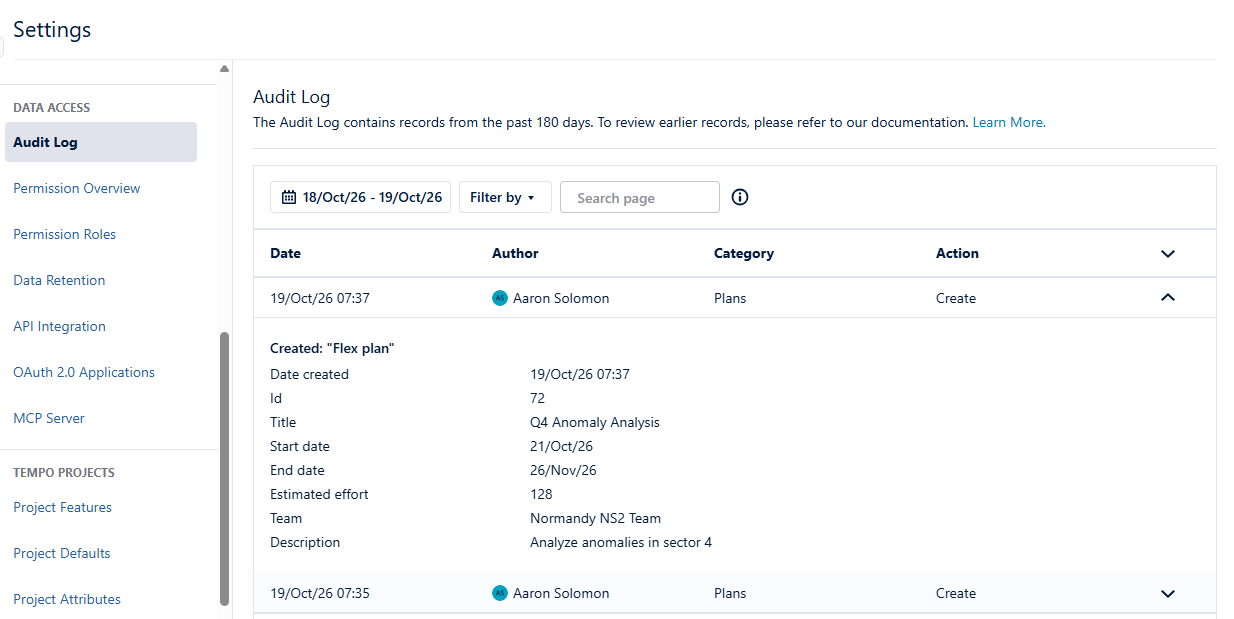
View the Audit Log
-
Navigate to Tempo Settings.
-
Under Data Access, select Audit Log.
-
Use the Date and Category filters to narrow down the records.
You can search the page for specific records (Ctrl+F), but note that the search only looks at the records currently loaded on the page. Scroll to the bottom of the page to load more records.
Audit log information is also accessible via Tempo API.
Supported Events
The following Capacity Planner events are recorded in the audit logs.
|
Event |
Actions |
|---|---|
|
Plan Created |
Recorded when a new plan is created, including the plan name and initial timeframe. |
|
Plan Updated |
Recorded when plan details are modified (e.g., name changes, timeframe adjustments). The log shows the previous and new values. |
|
Plan Deleted |
Recorded when a plan is removed from the system. |
|
Plan Approval Status Changed |
Recorded when a plan is submitted, approved, or rejected, identifying the user who changed the status. |
The above list is exclusive to Capacity Planner audit log events. For details on other events captured in the audit log, see Audit Log.