
-
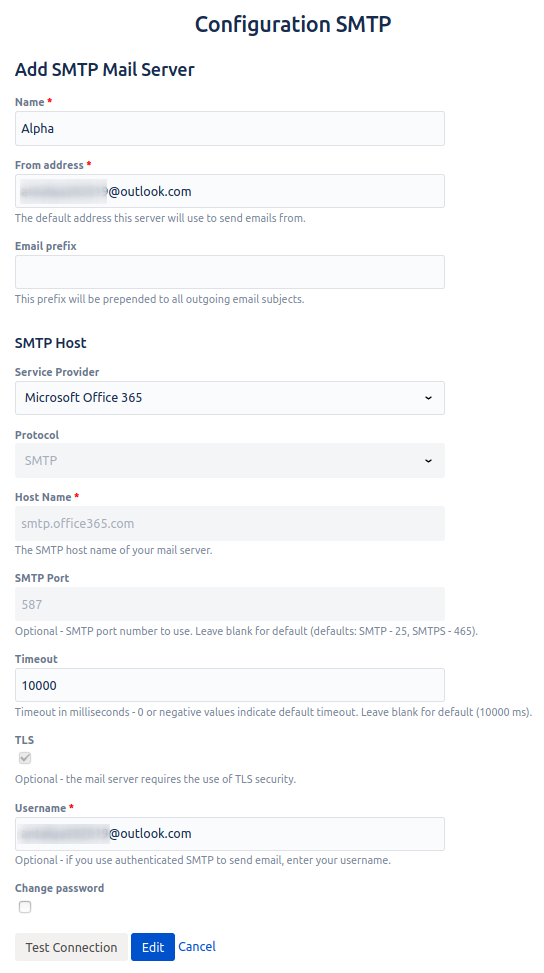
Go to the custom SMTP server configuration and fill in the fields as described:
-
Name - a required field, name of the SMTP server.
-
From address - a required field, the default address which will be used for outbound mail. Please make sure at least 1 email has been sent from this address manually (for the verification purpose).
-
Email prefix - a required field, this prefix will be prepended to all outgoing email subjects.
-
Service Provider - select Microsoft Office 365 from the list
-
Username - username of your email account linked to Office 365 (example name@outlook.com).
-
Password - password to your email account.
-
Test Connection - allows you to check the connection to the SMTP server. In case of an unsuccessful connection, an error message appears.
-
Save - saves all data and creates Office 365 server as configured.
-
Cancel - allows you to return to the “Custom SMTP server” page without saving data.
-
🔎 Basic Office 365 configuration can be found on this page: Office 365 configuration option .
🔎 To check your limits, please follow this page: Office 365 email sending limits .