
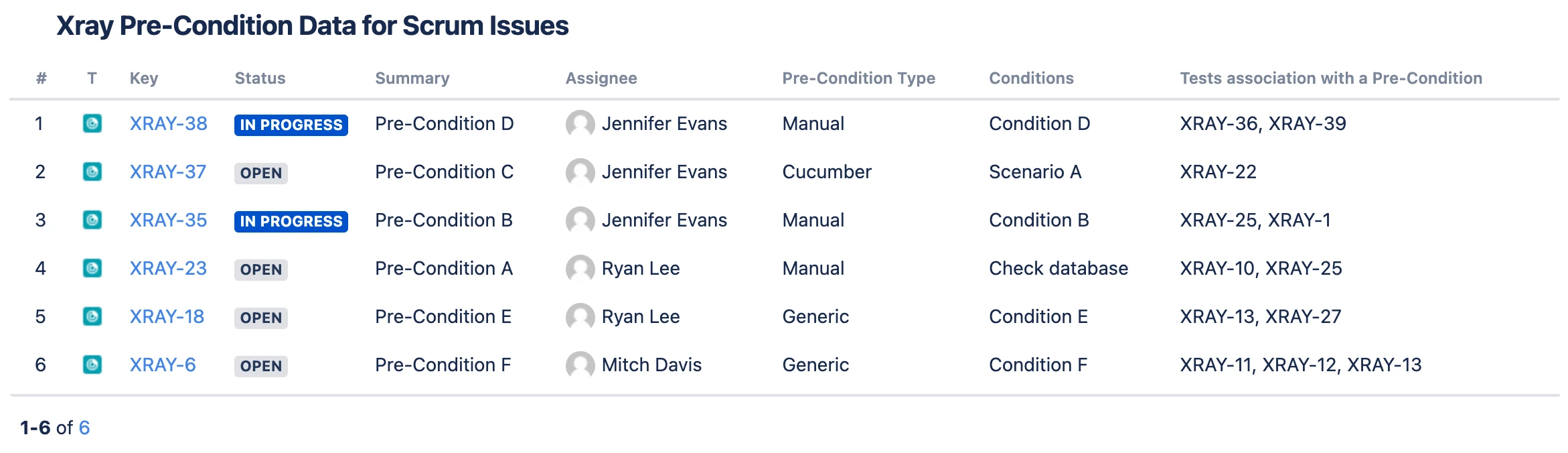
This chart displays a variety of Xray fields related to Xray Pre-Conditions (Server and Data Center only)
Recreate this Chart in Your Instance
-
Add the Issue List gadget or macro to your Dashboard or page
-
Set the Source to Advanced (JQL) and enter: issuetype=”Pre-Condition”
-
On the right side, under the Columns tab, scroll to the bottom and click +Add column and add the following fields:
-
System fields
-
Issue Type
-
Key
-
Status
-
Summary
-
Assignee
-
-
Xray fields:
-
Pre-Condition Type
-
Conditions
-
Tests association with a Pre-Condition
-
-
-
Click Save or Insert