
Time Tracker Assistant is a Rovo agent that helps streamline time tracking and reporting by intelligently analyzing your Jira activity and generating accurate, ready-to-use worklogs. It reviews your recent activity to suggest how you spent your time, automatically distributing hours across work items based on real work patterns.
With just a few clicks, you can confirm and log this time directly in Jira while staying compliant with admin rules. In addition, the agent provides quick access to detailed Time Tracker reports, giving you clear insights into your work across projects, sprints, and time periods without the usual manual effort.
What Time Tracker Assistant Does
The Time Tracker Assistant can only perform data fetching and tasks relating to the logged-in user, not for other individuals, even if the logged-in user has administrative or manager access.
-
Analyzes work activity
Summarizes logged hours, story points, and work item activity for any period, grouped by space, status, sprint, or work item type. -
Suggests worklogs
Detects work items you committed time to (via changelogs, comments, and existing worklogs) and suggests how much time to log on each, with smart time allocation based on activity weight and chronological start times. -
Logs work
Creates Jira worklogs directly from confirmed suggestions, respecting admin rules (locked dates, required descriptions, disabled spaces). -
Generates report links
Produces direct links to Time Tracker reports (Timesheet, TimeEntry, PieChart, CostReport, etc.) with filters, grouping, and date ranges.
How Time Tracker Assistant Suggestions Work
The agent reviews the following Jira activity for the requested period:
Changelogs — Status changes, field updates, assignee changes
Comments — Work Items you commented on
Existing worklogs — Time already logged (to avoid double-counting)
After reviewing the above activity, the agent then distributes the remaining daily budget (working hours minus already logged time) proportionally across active work items. Each suggestion includes the recommended start time based on when the activity actually occurred, so worklogs reflect your day’s timeline.
How to Use Time Tracker Assistant
-
In Jira, click the Ask Rovo button in the upper right corner to open the Rovo side panel.
-
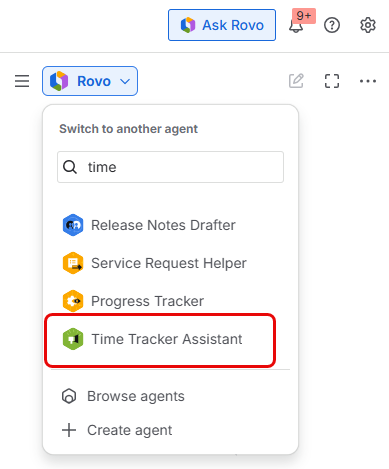
Click the Rovo dropdown and search for Time Tracker Assistant.
-
Enter your query or task in the text field. The Time Tracker Assistant will review all your Jira activity related to Time Tracker to answer your question or complete your requested task. For example:
- What did I do last week?
- Help me log my time from Friday.
- Generate a report for all my logged hours.