
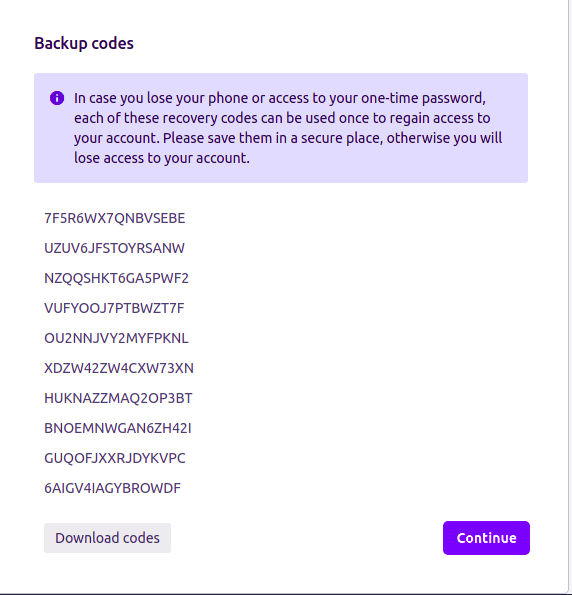
In case you have neither U2F device nor mobile authenticator (phone) you can use backup (recovery) codes and enter a one-time secret reserve key wich you have downloaded while enabling 2FA for Jira: U2F & TOTP process.
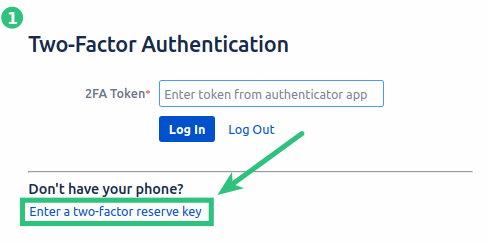
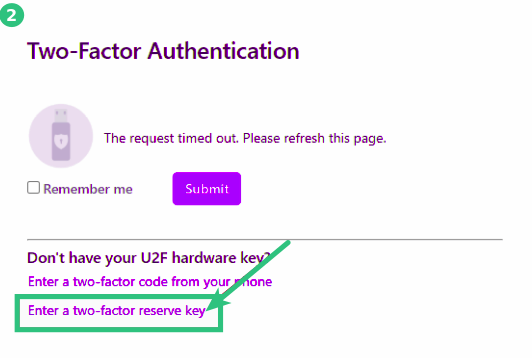
Step 1. Depending on which second factor (1 -TOTP) or (2 -U2F) do you use find Enter a two-factor reserve key link and press it.
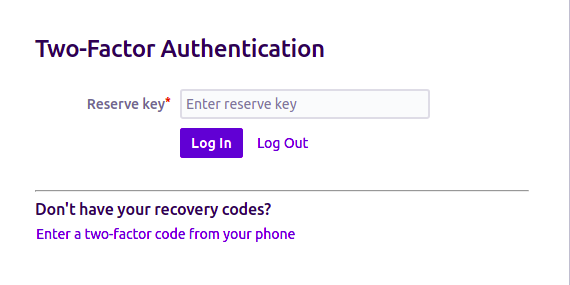
Step 2. Find your Backup codes and enter a one-time password reserve key.
Note: You can use one reserve key only once. After you log in to the system it won't be valid anymore. in other words, having 10 backup codes, you can log in to the system 10 times without using TOTP or U2F device.
Note: If you do not have the opportunity to use your mobile app (TOTP), U2F device or backup (recovery) codes contact your Jira administrator. Jira administrator always can reset your user authentication settings.